fancy cafe ai template
Use the built-in cafe reference with your own photos. Follow the upload, format and generation steps.
Turn one photo or two selfies into a fancy cafe AI video. A tiny table mistaken for a chair, and a very quiet realisation.
Choose your role. Add your photo.You settle onto a tiny steel disc, coffee in hand. A second guest walks in, sits on the concrete bench and puts their cup on the disc. It was a table all along. You pause, then quietly move down.
“POV: Your first time in a fancy cafe” is a TikTok comedy skit that spread in early November 2026. A newcomer perches on a small round wall table, thinking it is a seat; a second guest sits on the concrete bench below and puts a cup on it. Repost credits name comedian Kevin Winnik (@kevkevkiwi) for the filmed skit, and Know Your Meme logs an early AI version by @leehoustonx on November 1, 2026 set to “Oh Yeah?” by Steve Lacy.
Your portraits supply the cast; the cafe reference supplies the scene and timing. Read the tutorial for the trend background and a complete walkthrough.
Fancy Cafe AI is a single-template AI meme video generator: one or two photos in, a 15-second fancy cafe clip out.
Also searched as “first time at a fancy cafe” or “first time in a fancy coffee shop”.
what is the first time in a fancy cafe trend
First Time at a Fancy Restaurant: POV Video
how to make first time in a fancy cafe ai video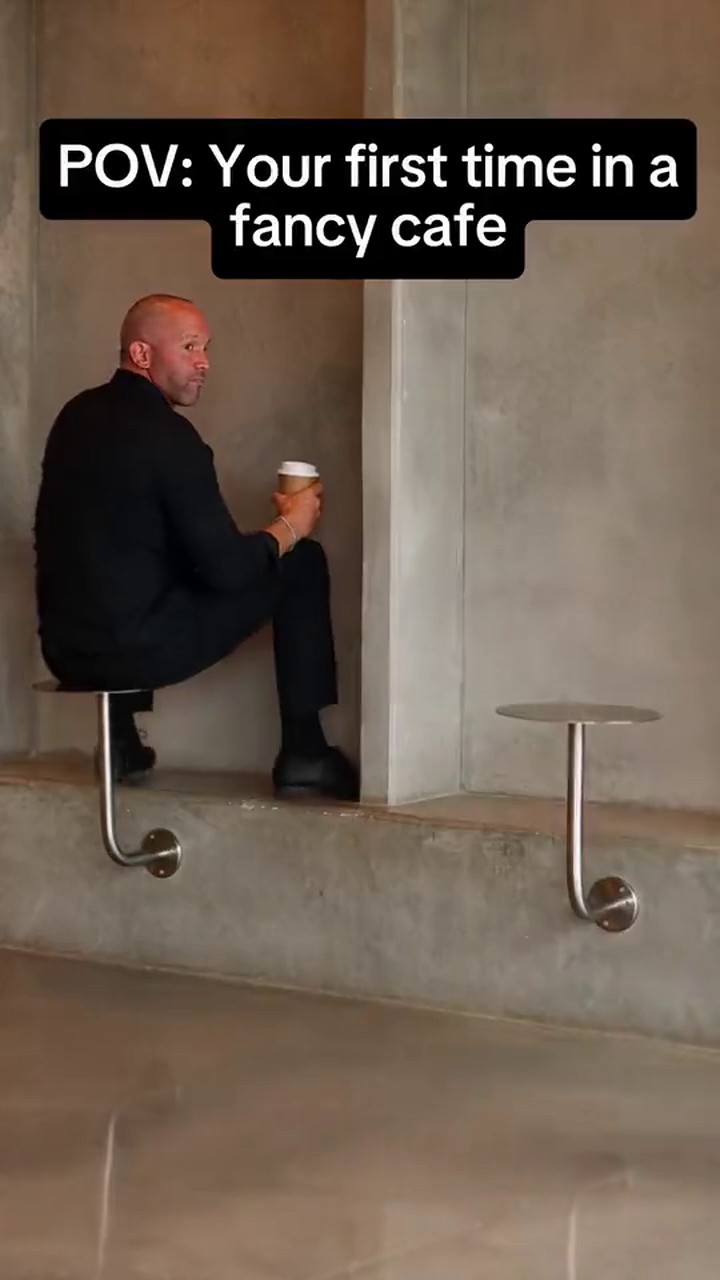
Need help with your photos or the next step? Choose a guide below.
Use the built-in cafe reference with your own photos. Follow the upload, format and generation steps.
Compare a CapCut edit with a photo-based AI remake and filming the scene yourself.
Understand the wrong-seat joke, the POV caption and the difference between filmed clips and AI remakes.
See what you can preview for free and which video generation steps require purchased credits.
Prepare two separate selfies and assign the person on the table and the guest arriving at the bench.
The same awkward moment, with you and someone who gets the joke.
You take the wrong seat. Keep the arriving guest from the reference.
Cast the overconfident friend on the table and the quiet observer on the bench.
Use two separate selfies. You do not need to pose together or film a date.
Make a kind, consented in-joke for the group chat, then review it before sharing.
For a two-person remake, the first time in a fancy cafe with friend guide explains which selfie goes in each role and how to prepare two photos taken separately.
Browsing examples and previewing photos are free. Generating a finished video uses purchased credits; there are no free generation credits.
20 credits per 15-second 480P video in the current configuration.
Separate selfies can supply each role. You do not need to write an editing prompt.
Prepare portraits on your phone, or use the existing phone-upload feature from a desktop.
My videos displays 3 days of records. Files use temporary links; save your video promptly.
Read the fancy cafe ai free guide to check the difference between free photo previews and paid video generation before choosing your credits.
The fancy cafe capcut template comparison explains when to edit existing footage and when to create a new clip from photos.
One payment. 1, 5, or 20 cafe videos. Each 15-second, 480P video uses 20 credits, with audio enabled.
For your first wrong-seat moment.
1 video20 credits
1 at 480p · 0 at 720p
$8.90 per video
Try more people, scenes and versions.
5 videos100 credits
5 at 480p · 2 at 720p
$5.98 per video
For creators with more cafe moments to tell.
20 videos400 credits
20 at 480p · 8 at 720p
≈ $5.00 per video
One-time USD packs. Purchased credits never expire. Choose any cafe case style with your credits.
Seedance 2.5: 15s · 480p costs 20 credits · 720p costs 45 credits.
It is a wrong-seat comedy scene in a minimalist cafe: someone perches on a tiny steel table, sees a guest sit on the concrete bench, realises the mistake and quietly moves. The humour is the confusing furniture, not a new dance.
Choose Solo to pick a reference and upload one portrait, or With a friend to upload two portraits for the fixed wall-corner cafe scene. Sign in and use purchased credits to generate. Check the finished clip before downloading; you do not need to write a prompt.
Photo previews and reference browsing are free. Video generation uses purchased credits and there are no free sign-up credits. A 15-second Seedance 2.5 video uses 20 credits at 480p or 45 credits at 720p. Choose from $8.90 for 20 credits, $29.90 for 100 credits, $99.90 for 400 credits. These are one-time packs, not a subscription.
Previews stay in your browser; generation sends processed photos to the configured video provider. Phone transfer also uses temporary application storage. Provider retention, training use and deletion guarantees have not been verified. Do not upload sensitive images; read the Privacy page for local drafts, transfer storage and deletion options.
No. Upload one or two photos in your browser; Fancy Cafe AI generates a new 15-second clip, so you do not need CapCut or a template link.
Use a sharp, well-lit, front-facing photo of one person, without sunglasses or heavy filters. Accepted formats: JPEG, PNG, WebP. HEIC is not supported; on iPhone, export or share as JPEG. For two people, use two separate portraits. Each run is generated fresh, so results vary.
Download promptly. My videos shows the last 3 days of records, which is not a storage guarantee. Temporary provider links may expire within 24 hours or sooner.
Fancy Cafe AI offers 480p / 720p.
Yes. Solo uses photo 1 and keeps the other reference character. With a friend uses two separate portraits, one clear face per photo.
Use a sharp, well-lit, front-facing photo of one person, without sunglasses or heavy filters. Accepted formats: JPEG, PNG, WebP. HEIC is not supported; on iPhone, export or share as JPEG. For two people, use two separate portraits. Each run is generated fresh, so results vary.
The original skit runs about 21 seconds. Fancy Cafe AI generates a 15-second clip of its core moment: the wrong seat, the guest arriving, the pause and the move. Choose 480p or 720p, vertical 9:16 for TikTok, Reels or Shorts, or horizontal 16:9. You can check progress in the studio or My videos while it renders.
Audio is enabled for each video. The selected reference guides the sound and timing, while AI-generated audio can differ from the reference. Listen to the finished clip before posting; reference audio does not include a commercial music licence.
Fancy Cafe AI does not add a site watermark. Review your finished video before downloading and sharing it.
You can browse the references and preview your photos without an account. Generation, credit purchases and your private video history require sign-in. Credit purchases and private history use the same signed-in account.
Yes. On iPhone or Android, open https://aifancycafe.video in your browser and choose photos from your camera roll. Export HEIC as JPEG first. Download the finished MP4, then upload it in your social app. No editing app or written prompt is required.
Confirmed failed generations return reserved credits. Pending tasks are checked before any refund.
Yes. Return to the studio or My videos with the same account to check your saved task. My videos shows the last 3 days of records. Temporary provider links may expire within 24 hours or sooner; download finished videos promptly.